Best AI Tools for Students 2026: 8 Free Tools, Organized by Task
Eight AI tools that actually solve a specific student task — essays, research, studying, note-taking, or presentations — with prices and student deals checked against each company’s own site rather than copied from older roundups[span_0](start_span)[span_0](end_span).
One honest caveat before you read further: several of the student discounts below have already changed once or twice in 2026, and one deal that was live a few weeks ago has since been replaced by a better one. Treat every price and deal here as “true as of the date at the top of this article” and click through to confirm before you sign up[span_1](start_span)[span_1](end_span).
ChatGPT Free (essay drafting, concept explanation), Grammarly Free (grammar and tone), Google NotebookLM (free source-cited research from your own uploaded material), Perplexity AI (free basic search, $10/month Education Pro for more), and Canva AI (free plan, free Pro for some students via Canva for Campus) cover essays, research, studying, and presentations at no cost to start[span_2](start_span)[span_2](end_span).
Table of Contents
Why These Tools Are Worth Setting Up
The time these tools save isn’t in the thinking — it’s in the mechanical work around it: formatting a bibliography, fixing grammar, re-reading notes from a lecture you half-missed, hunting for sources for an introduction you haven’t written yet. That’s the work AI removes. The argument, the analysis, and the actual writing are still yours to do[span_3](start_span)[span_3](end_span).
AI companies are still competing for student users in 2026 — OpenAI, Google, Perplexity, and Canva all run some form of student pricing or free tier. But these programs change terms often, sometimes within weeks of each other, so treat any specific deal as something to verify at the source rather than a fixed promise[span_4](start_span)[span_4](end_span).
The 8 Tools, Organized by Task
1. ChatGPT Free — Essays, Explanations & Brainstorming
OpenAI removed the free tier’s text-message cap starting the week of August 10, 2026 — free and Go accounts now get unlimited everyday text chats, replacing the old limit of roughly 10 messages every 5 hours. The free tier’s default model also switched from GPT-5.5 Instant to GPT-5.6 Luna around the same time[span_5](start_span)[span_5](end_span).
Use it to explain a confusing concept in plain terms, generate an essay outline from a title and argument, brainstorm counterarguments, simplify a dense academic source, or work through a problem set with step-by-step explanations[span_6](start_span)[span_6](end_span).
Prompts worth trying: “Explain [topic] like I’m a beginner” / “Create a study guide for [subject] with 10 key concepts” / “What are the strongest counterarguments to [thesis]?[span_7](start_span)”[span_7](end_span)
Cost: Free forever | Go $8/month | Plus $20/month | chatgpt.com
2. Google NotebookLM — Research, Notes & Summarizing Sources
You upload your PDFs, lecture notes, or textbook chapters, and NotebookLM answers questions using only what you gave it — with a citation back to the specific page or passage. It won’t invent a source or a statistic, because it isn’t searching the open web; it’s reading what you uploaded[span_9](start_span)[span_9](end_span).
That makes it well suited to literature reviews, exam prep from specific lecture material, and pulling a common thread across a stack of related PDFs — a task that otherwise means re-reading everything yourself[span_10](start_span)[span_10](end_span).
Cost: Completely free | notebooklm.google.com
3. Perplexity AI — Research & Finding Cited Sources
Perplexity searches the web and shows exactly which page or paper each fact comes from, with clickable links — unlike a plain chatbot, which can present an unsourced claim with total confidence. The free plan includes unlimited basic search; the deeper “Pro Search” mode is capped daily on the free tier[span_11](start_span)[span_11](end_span).
Worth remembering: Perplexity finds and cites sources — it doesn’t replace reading and judging them yourself. Click through and verify before citing anything in graded work[span_13](start_span)[span_13](end_span).
Cost: Free (unlimited basic search) | Education Pro $10/month | Pro $20/month | perplexity.ai
4. Grammarly Free — Writing Quality & Academic Tone
The free tier handles unlimited grammar, spelling, and punctuation checking across Google Docs, Word, your browser, and email. It also explains why a correction is suggested, not just what to change — which is the part that actually improves your writing over a semester rather than just patching individual errors[span_14](start_span)[span_14](end_span).
Grammarly’s parent company renamed itself Superhuman in October 2025 after acquiring the Superhuman email app, folding Grammarly into a broader “Superhuman Suite.” The Grammarly product itself kept its name, price, and free tier unchanged — you’ll just see “Superhuman” mentioned around it now[span_15](start_span)[span_15](end_span).
Related: our best free AI writing tools guide covers options that pair well with Grammarly[span_16](start_span)[span_16](end_span).
Cost: Free forever (grammar/spelling) | Pro $12/month (style, tone) | grammarly.com
5. Google Gemini Free — Google Docs Users & Research Summaries
Google’s student AI offers have changed twice in 2026, so here’s the current state as of this update: the original 12-month free Google AI Pro deal closed to new signups on March 11, 2026 (final redemptions closed April 30, 2026). A follow-up deal offering free Google AI Plus through Handshake ran through August 21, 2026 and has since ended[span_17](start_span)[span_17](end_span).
Google then relaunched its own official student program directly on August 19, 2026: eligible college students in the United States get Google AI Pro free for 12 months (normally $19.99/month), and students in 140+ other markets get Google AI Plus free for 12 months (normally $4.99–$7.99/month depending on region). Both windows are open through December 31, 2026. A payment method is required at signup and the plan renews at the standard price unless you cancel before the year ends. Check current eligibility at gemini.google/students before assuming which version applies to you[span_18](start_span)[span_18](end_span).
What’s reliably free regardless of that offer: Gemini’s standard free tier, which integrates directly into Google Docs, Slides, and Gmail — highlight a paragraph, ask Gemini to improve it, and the rewrite appears inline[span_19](start_span)[span_19](end_span).
Cost: Free standard tier forever | Free 12-month Pro (US) or Plus (140+ markets) via the official student offer, through Dec 31, 2026
6. Anki + AI Plugins — Exam Preparation & Memorization
Anki uses spaced repetition to schedule flashcard reviews at roughly the point your brain is about to forget a concept. AI speeds up the flashcard-creation step: paste your notes into ChatGPT and ask it to convert them into question-and-answer pairs formatted for Anki import[span_20](start_span)[span_20](end_span).
Cost: Free (desktop, Android, web sync via AnkiWeb) | AnkiMobile is a one-time $24.99 purchase on iPhone/iPad, not a subscription
7. Canva AI — Presentations & Visual Projects
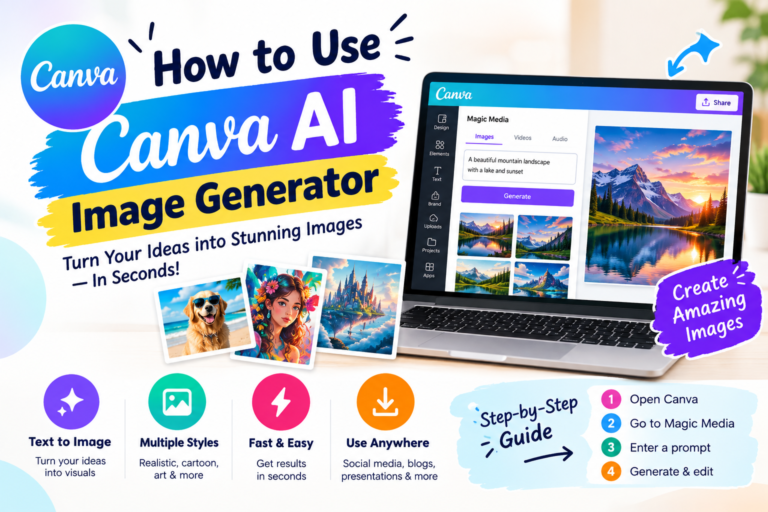
Canva’s free plan with AI features — Magic Write for slide text, an AI image generator, and templates pre-sized for presentations, posters, and infographics — covers most student visual work without design experience[span_21](start_span)[span_21](end_span).
See our full guide to Canva AI for setup details[span_23](start_span)[span_23](end_span).
Cost: Free plan | Free Pro via Canva for Campus (institution-dependent) | Pro ~$13–18/month otherwise | canva.com
8. Khan Academy Khanmigo — AI Tutor (School-Dependent Access)
Khanmigo won’t just hand you an answer — it works through the reasoning with you using guided questions, which is a genuinely different design choice from most AI tools on this list. It’s particularly aimed at maths, science, and standardized test prep[span_24](start_span)[span_24](end_span).
Access depends on your school: it’s free for students at institutions with a Khan Academy Districts partnership, which covers many schools but not all. If yours isn’t enrolled, check khanacademy.org/khan-labs for current independent access options[span_25](start_span)[span_25](end_span).
Cost: Free if your school has a Khan Academy Districts partnership | Check khanacademy.org for independent access
Quick Task-to-Tool Reference
Swipe sideways on mobile to see every column.
| Academic Task | Best Free Tool | Runner-Up | Free? |
|---|---|---|---|
| Essay Writing / Drafting | ChatGPT | Claude Free | Yes |
| Research & Citations | Perplexity AI | NotebookLM | Yes |
| Note Summarization | NotebookLM | Gemini | Yes |
| Grammar & Editing | Grammarly Free | ChatGPT | Yes |
| Exam Prep / Flashcards | Anki + AI | Khanmigo | Yes |
| Presentations / Design | Canva AI | Gamma | Yes (free plan) |
| Concept Understanding | Khanmigo | ChatGPT | Yes |
| Google Docs Workflow | Gemini Free | Grammarly | Yes |
Setting Up Your Toolkit
You don’t need all eight tools at once. Here’s the fastest path to a working setup[span_26](start_span)[span_26](end_span).
Step 1 — Core Writing Stack
Create a free ChatGPT account at chatgpt.com and install the Grammarly browser extension from grammarly.com. ChatGPT for ideas, outlines, and drafts; Grammarly for editing the result[span_27](start_span)[span_27](end_span).
Step 2 — Research Layer
Create a free Perplexity account at perplexity.ai for finding sources on new topics. Then sign into notebooklm.google.com with your Google account and upload a set of lecture notes or a PDF you need to study — ask it a question and check that the citation actually points to the right passage[span_28](start_span)[span_28](end_span).
Step 3 — Presentation and Visual Work
Create a free Canva account at canva.com and search for a template matching your assignment type. The AI image generator sits in the left toolbar — use it instead of generic stock photos[span_29](start_span)[span_29](end_span).
Step 4 — Check Current Student Deals
Check gemini.google/students directly for Google’s current student offer — it has changed twice already in 2026. Also check the GitHub Student Developer Pack (github.com/education), which has historically included GitHub Copilot at no cost for verified students; confirm current terms on GitHub’s own page, since developer-pack offers change too[span_31](start_span)[span_31](end_span).
Which Tools Fit Your Situation
Humanities or social sciences, writing essays constantly: ChatGPT for outlines and argument brainstorming, Perplexity for academic sources, Grammarly for the final pass[span_32](start_span)[span_32](end_span).
STEM, working through complex concepts: Khanmigo for guided problem-solving where you want to understand the method, not just the answer (check your school’s access first); ChatGPT for explaining theory and generating extra practice problems[span_33](start_span)[span_33](end_span).
Postgraduate or dissertation research, large reading lists: NotebookLM is the standout here — upload your reading list as PDFs and use it to find cross-references across sources rather than re-reading everything yourself[span_34](start_span)[span_34](end_span).
Regular presentations or visual projects: Canva AI for design, ChatGPT for slide content. Check whether your university participates in Canva for Campus before paying for Pro[span_35](start_span)[span_35](end_span).
Mistakes That Actually Cost Students Marks
Raw AI output has a recognizable rhythm, and markers who read dozens of essays a term notice it. Rewrite it, add your own examples, and make sure the analysis is actually yours[span_36](start_span)[span_36](end_span).
ChatGPT can generate a plausible-sounding citation that doesn’t exist. Use Perplexity or NotebookLM for sourcing, and click through to verify a source is real before it goes in your bibliography[span_37](start_span)[span_37](end_span).
Google’s own student offer has changed twice in 2026 alone. Canva’s education access and GitHub’s Student Pack have their own eligibility rules too. Check the official page before relying on any guide’s claim — including this one[span_38](start_span)[span_38](end_span).
Universities vary widely on what’s permitted — some allow AI for drafting, some only for grammar checking, some prohibit it entirely on graded work. Know your course’s specific policy before using any of these tools on assessed work[span_39](start_span)[span_39](end_span).
Every tool on this list is usable for free. Test it for a real assignment before deciding whether the paid tier is worth it for your workload specifically[span_40](start_span)[span_40](end_span).
Five Ways to Use These Tools Better
Frequently Asked Questions
Can students use ChatGPT for free?
Yes. As of August 2026, free-tier text chats are unlimited (replacing the older ~10-messages-per-5-hours cap), running on the new default model GPT-5.6 Luna. US free-tier users still see ads on some answers, and the top reasoning model (GPT-5.6 Sol) stays paid-only, starting at $8/month[span_46](start_span)[span_46](end_span).
Is using AI for homework considered cheating?
It depends entirely on your institution’s policy, which varies by university and even by course. Grammar checking is widely permitted; using AI-generated text as your own original work is treated as academic misconduct at most institutions. Check your course’s specific AI policy, and ask your instructor directly when in doubt[span_47](start_span)[span_47](end_span).
Is Google’s free year of Gemini still available for students?
Not the original deal — that closed March 11, 2026. A follow-up Handshake offer for free Google AI Plus also ended, on August 21, 2026. Google relaunched its own official student program on August 19, 2026: free Google AI Pro for 12 months (US) or free Google AI Plus for 12 months (140+ other markets), through December 31, 2026. Confirm current terms at gemini.google/students[span_48](start_span)[span_48](end_span).
What’s the best free combination for exam preparation?
NotebookLM for summarizing your own lecture notes and materials, paired with Anki and AI-generated flashcards for spaced repetition. Khan Academy’s Khanmigo is a strong option for maths and science if your school has a Khan Academy Districts partnership[span_49](start_span)[span_49](end_span).
Where to Start
Start with ChatGPT, Grammarly, and Perplexity — that covers essay support, writing quality, and researched sources, and takes about twenty minutes to set up. Add NotebookLM once you have real reading material to upload; it’s the highest-impact tool here for anyone working through a long reading list. Check your student deals before paying for anything, and verify the terms directly rather than trusting a screenshot from a few months ago — as this article’s own Google section shows, they don’t stay still for long[span_50](start_span)[span_50](end_span).
Build Your Free AI Student Toolkit
ChatGPT free + Grammarly + NotebookLM — set up in under 20 minutes, at zero cost[span_51](start_span)[span_51](end_span).