
Best AI Video Generators for Faceless YouTube (2026)
Most faceless YouTube channels fail for one reason: inconsistent publishing. The creators who stick with it are producing 3 to 5 videos a week. Without an AI video tool, that schedule is close to a full-time job.
The best AI video generators for faceless YouTube channels in 2026 close that gap — you can go from script to published video in under 20 minutes with the right tool. The harder question is which paid plan is actually worth the monthly cost for your specific channel type, especially since pricing across this category has been shifting fast this year.
This guide ranks 5 tools by value per dollar spent, based on independent research rather than marketing pages. Where pricing sources genuinely disagree with each other — which happened more than expected while researching this piece — that’s flagged explicitly rather than hidden behind a confident-sounding number.
The best AI video generators for faceless YouTube channels in 2026 are InVideo AI (entry tier from roughly $17–35/month depending on billing, prompt-to-video with a large stock library), Pictory (from around $23/month, blog-to-video), HeyGen (from around $24–29/month, AI avatar presenter), and Runway (entry pricing from roughly $12–15/month, cinematic AI-generated B-roll). InVideo leads for prompt-to-video speed. Pictory leads for repurposing written content. HeyGen wins when the channel needs a consistent on-screen presenter without a real human on camera. All figures should be confirmed on each provider’s own pricing page before you subscribe — this category has repriced multiple times in the past year.
📋 Table of Contents
- What Actually Works on Faceless YouTube in 2026
- The 5 Best Paid AI Video Tools for Faceless Channels
- Full Comparison Table
- How to Pick the Right Tool for Your Channel Type
- Which Tool for Which Creator
- 5 Mistakes That Kill Faceless Channel Growth
- 5 Pro Tips for Faster Video Output
- Frequently Asked Questions
- Final Verdict
What Actually Works on Faceless YouTube in 2026
Faceless YouTube has moved past the “slideshow with voiceover” era. Channels doing well in 2026 tend to produce either consistent AI-avatar-hosted explainers or high-quality stock-and-generative video with professional voiceover. Both formats are monetizable. Both need a paid tool to hit the publishing frequency YouTube’s algorithm tends to reward.
The YouTube Partner Program requires content to be original and add genuine value, and AI-generated videos are eligible for monetization on that basis. Two separate 2025 policy actions are worth knowing about, since they get conflated a lot: in May 2025, YouTube added a disclosure checkbox in YouTube Studio for content that’s realistically altered or synthetic — meaning it could be mistaken for a real person or real footage, not simply “made with AI.” A clearly synthetic narrator voice that isn’t impersonating a specific real person generally doesn’t need this disclosure. Separately, on July 15, 2025, YouTube renamed its “repetitious content” policy to “inauthentic content” and tightened it specifically to target mass-produced, templated videos with little original human input — this is the policy that actually affects monetization eligibility, not the disclosure checkbox itself. Channels using AI tools with genuine original scripting and editing have been monetized successfully since well before either of these changes.
Commonly cited high-CPM niches for faceless channels in 2026 include finance, health and wellness, software tutorials, and business education — though exact CPM ranges vary widely by audience geography and season, so treat any specific number you see (including from us) as a rough directional signal rather than a guarantee. Pick your niche before your tool. Each tool on this list produces meaningfully different output quality depending on content type.
The 5 Best Paid AI Video Tools for Faceless YouTube Channels in 2026
1. InVideo AI — Best for Prompt-to-Video at Scale
InVideo AI bundles access to 200+ underlying image, video, audio, and music models inside one workspace. You type a topic or paste a script; InVideo writes the scene breakdown, pulls matching stock or AI-generated footage, adds an AI voiceover, drops in background music, and renders. Editing is command-based rather than timeline-based — you type instructions like “make the second scene more dramatic” instead of dragging clips.
Separately from the frontier-model question, InVideo’s Plus plan is still a strong prompt-to-video tool on its own merits — a large stock and template library, AI voiceover in dozens of languages, and voice cloning on paid tiers. Multiple sources note that AI-generation credits, stock-footage credits, and voice-clone slots are tracked as separate pools that don’t roll over month to month, which is worth planning around if you’re a heavy user.
✅ Pros
- 200+ AI models bundled across tiers, more than any single-tool competitor
- Prompt-based editing — no timeline required
- Fast time-to-publish once you learn the command syntax
- Large stock asset library when AI generation isn’t necessary
❌ Cons
- Entry-tier credits are consumed quickly by generative models — Max/Generative or top-ups needed for regular use
- Separate, non-rolling credit pools can catch new users off guard
- Pricing has shifted multiple times this year; confirm the live tier and price before subscribing
*Independent trackers disagree meaningfully on exact prices in 2026 — verify on InVideo’s own pricing page.
2. Pictory — Best for Turning Written Content into Videos
Pictory’s core workflow is different from every other tool on this list. Paste a blog URL or a script, and Pictory splits it into scenes, matches each segment to relevant stock B-roll, adds captions, overlays an AI voiceover, and builds a complete video. For creators who already write content — blogs, newsletters, scripts — Pictory turns that existing content into YouTube videos without starting from scratch.
Pictory’s entry-level Standard plan is commonly reported at around $23/month for roughly 30 video projects a month, though — worth being upfront about — pricing trackers checked while researching this piece genuinely disagree with each other, citing figures anywhere from about $19 to $29/month for what’s described as the entry tier, with video limits described inconsistently as a count of videos versus a pool of minutes. That kind of spread across sources dated close together in 2026 suggests either recent repricing, regional differences, or both. Confirm the live number on Pictory’s own pricing page rather than trusting any single source, including this one.
✅ Pros
- Among the cheapest cost-per-video of any tool on this list
- URL-to-video workflow — paste a link, get a video
- Highlight-reel extraction from longer videos
- Auto-captions with brand kit support on paid tiers
❌ Cons
- Relies on stock footage, not AI-generated visuals
- Less creative control than prompt-based tools
- Pricing and quotas vary meaningfully by source — verify directly
Verify the exact tier and price before subscribing — this category reprices often.
3. HeyGen — Best for Faceless Channels with an AI Presenter
“Faceless” doesn’t have to mean no presenter. HeyGen lets you run a channel with a consistent AI avatar as the host — the channel stays faceless in the sense that no real person is on camera, but viewers get a visual anchor. HeyGen’s Avatar IV technology (introduced August 2025) is a genuine step up in realism over earlier avatar generations, with more natural gestures and expression.
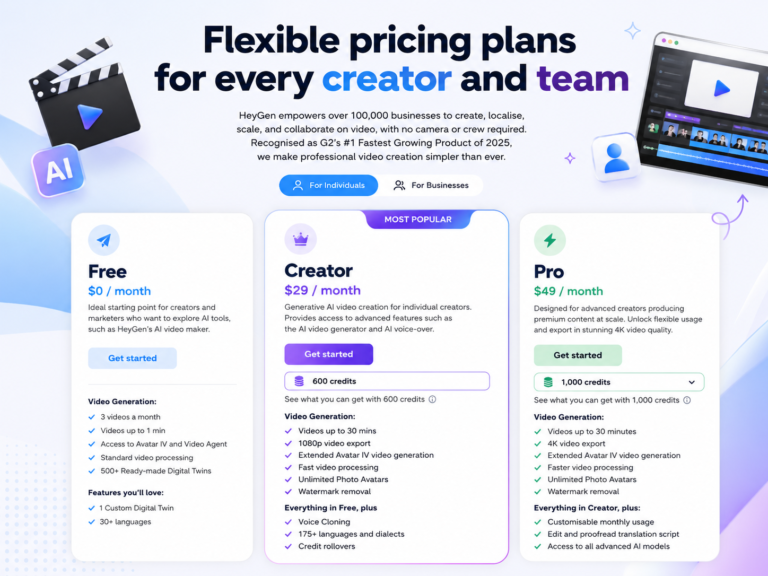
HeyGen’s Creator plan is consistently reported across multiple independent sources at $29/month billed monthly, or $24/month on annual billing. The number that actually matters more than the sticker price: Creator includes 200 Premium Credits per month, and Avatar IV — the realistic, production-quality avatar tier — consumes 20 credits per minute of finished video. That works out to roughly 10 minutes of Avatar IV video per month before you’d need to either buy more credits or upgrade. Standard (non-Avatar IV) avatar video draws from a separate, unlimited pool on paid plans, so the constraint specifically hits your premium-quality output, not your total video count.
HeyGen’s avatar quality is widely reported as ahead of Synthesia’s for audience-facing, marketing-style content — see the HeyGen vs Synthesia comparison for a side-by-side breakdown of where each tool actually wins.
✅ Pros
- Strong avatar realism for audience-facing content
- 175+ languages for multilingual channel strategies
- Video translation included on paid plans
❌ Cons
- The credit system, not a flat “minutes” number, is the real constraint
- Custom avatars require a much higher-tier plan than some guides suggest
- Community sentiment on pricing clarity is mixed across recent reviews
*Credit allocation may have changed recently — check your account’s current balance.
4. Runway — Best for Cinematic B-Roll
Runway doesn’t replace a video production workflow — it adds footage that doesn’t exist anywhere else. When you need an aerial shot that looks nothing like a stock photo, or atmospheric B-roll no other channel has used, Runway’s generative models produce it. Text-to-video, image-to-video, and video transformation all run from the same interface.
Runway’s newer generation models are frequently cited as leading or near-leading blind preference comparisons against other frontier video models for cinematic visual quality, though “best” in these comparisons shifts fast as every major provider ships new versions multiple times a year — treat any specific ranking, including ones on this page, as a snapshot rather than a permanent verdict. Pricing runs on a credit system where higher-quality generation tiers consume credits faster per second of output, so the effective cost per finished minute can be meaningfully higher than the headline monthly price suggests. Check Runway’s own credit-cost breakdown for your intended output quality before budgeting.
Runway works best as a B-roll supplier, not a full channel workflow tool. Most creators who use it pair it with Pictory or InVideo: generate custom footage in Runway, import it into the main tool, and use it to replace generic stock clips.
✅ Pros
- Among the strongest cinematic quality of any tool on this list
- Lowest entry price of the five tools compared here
- No watermark on paid-plan exports
❌ Cons
- Not a complete video production tool — needs a separate editor or pipeline
- Higher-quality generation modes burn credits fast; effective cost per minute can be high
- Clips are short and typically need stitching for longer videos
Verify the exact tier and price before subscribing — credit costs vary by generation quality.
5. Synthesia — Best for Educational and Training-Style Channels
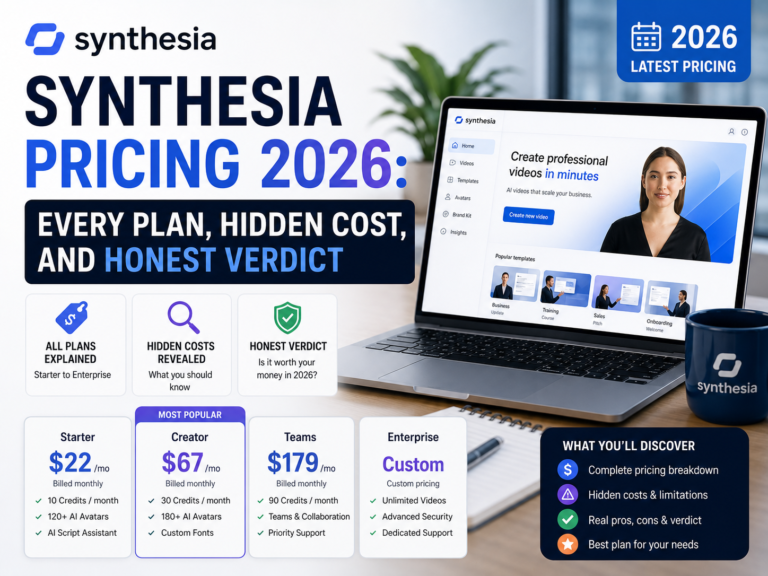
Synthesia ranks fifth here because the platform is built around corporate training and communications, not audience retention. For educational YouTube channels targeting a professional audience — HR training, compliance education, software tutorials for enterprise tools — the output quality and multilingual support are strong.
The Starter plan runs about $18/month on annual billing (higher billed monthly), with roughly 10 minutes of video per month and 125+ avatars. Narration is available in 140+ languages on Starter and Creator plans. The 10-minute monthly limit is a real constraint for any channel publishing more than 2–3 short videos a month.
Verify the exact tier and price before subscribing — this category reprices often.
Full Comparison Table — Faceless YouTube AI Tools 2026
| Tool | Entry Paid Tier | AI-Generated Visuals | Voiceover / Presenter | Best For |
|---|---|---|---|---|
| InVideo AI | ~$17–35/mo* | Listed on all tiers, credit-limited* | Yes (AI voiceover, cloning on paid tiers) | Prompt-to-video speed |
| Pictory | ~$19–29/mo* | No (stock only) | Yes | Blog repurposing |
| HeyGen | ~$29/mo ($24/mo annual) | Yes (Avatar IV, credit-metered) | Yes (avatar lip-sync) | AI avatar presenter |
| Runway | ~$12–15/mo | Yes (leading cinematic quality) | No | Cinematic B-roll |
| Synthesia | ~$18/mo (annual) | No | Yes (avatar) | Pro education channels |
How to Pick the Right Tool for Your Channel Type
Three questions narrow the choice quickly.
Do you have existing written content to repurpose? If yes, Pictory is the obvious starting point — the URL-to-video workflow makes it the highest-ROI tool for any creator who already writes.
Does your channel need a consistent presenter? If yes, HeyGen gives you a branded AI avatar without needing to commit to Synthesia’s more corporate-leaning workflow. Pick one avatar and use it consistently across videos to build visual brand recognition.
Do you need to publish daily or near-daily? InVideo AI’s prompt-based workflow supports the highest publish frequency of the tools compared here — just confirm which pricing tier actually gives you the credit volume your publishing schedule needs, rather than assuming the entry tier covers unlimited generative output.
Which Tool for Which Creator
5 Mistakes That Kill Faceless Channel Growth
The right AI video tool depends on content type, not just the feature list. Lock your niche first, then pick the tool that produces the right visual style for that audience.
Every tool on this list has watermarks, lower resolution, or reduced AI model access on free tiers. Use the free trial to test the interface and workflow, then judge output quality only from the paid plan.
AI video tools produce a draft. High-performing faceless channels edit that output before publishing — checking script accuracy, reviewing B-roll relevance, trimming dead time. Treating AI output as a finished product is a common early mistake.
The AI video tool handles the content; the thumbnail drives the click. Channels that invest in good thumbnails consistently outperform channels with the same content but weaker thumbnails.
YouTube’s algorithm rewards consistent publishing. The AI tools on this list exist to remove the production bottleneck that causes inconsistency — if you’re still struggling to publish on schedule after adopting one, the problem is usually the content pipeline (topic selection, scripting), not the video tool itself.
⚡ 5 Pro Tips for Faster Faceless Video Output
Frequently Asked Questions
What is the best AI video generator for faceless YouTube in 2026?
InVideo AI is a strong choice for faceless YouTube channels that need to publish at volume, thanks to its large bundled model library and prompt-based editing. For channels repurposing existing written content, Pictory is typically faster and cheaper. For channels built around an AI avatar presenter, HeyGen currently produces realistic output.
Can you monetize AI-generated YouTube videos in 2026?
Yes. YouTube allows AI-generated content in the Partner Program as long as it adds genuine value and isn’t mass-produced or templated, provided proper disclosure is met when content is realistically synthetic.
Which AI tool makes faceless YouTube videos fastest?
InVideo AI and Pictory are generally the fastest for total time from idea to published video, based on their prompt-to-video and script-to-video automated workflows.
How much does it cost to run a faceless YouTube channel with AI tools?
A functional faceless YouTube channel using a single AI video tool commonly costs in the $15–30/month range at the entry paid tier, while combining two tools typically lands in the $35–45/month range.
What AI tool turns blog posts into YouTube videos?
Pictory is the primary tool for converting blog posts into YouTube videos by automatically parsing URLs, matching B-roll footage, and adding voiceover.
Final Verdict — Which Tool Should You Pay For?
The best AI video generator for faceless YouTube channels in 2026 comes down to three clear cases.
Choose InVideo AI if you’re starting from scratch and want the fastest time-to-publish, but confirm which pricing tier actually gives you enough credit volume for the generative output you’re after before you commit to annual billing.
Choose Pictory if you already write blog posts, scripts, or newsletters and want to convert that content into YouTube videos at one of the lower cost-per-video levels available.
Choose HeyGen if you want a consistent AI presenter as the channel’s visual anchor, and run the credit math against your planned publishing volume before choosing a tier.
All of these can be tested free before you pay. Start with the free tier, generate one test video with your actual script, and check whether the output matches your channel’s standard. That test costs nothing and answers the question faster than any comparison article, including this one.