10 AI Art Generators With No Sign Up in 2026 — Ranked by Output Quality and Real Limits
Looking for an AI art generator you can use without creating an account? This page covers ten tools tested in 2026 — same prompts, same devices — ranked by actual output quality and the real limits you’ll hit. Two of these tools require a login (Microsoft and Adobe), but only if you don’t already have those accounts. The other eight require zero signup. Everything below reflects actual testing, not marketing claims.
🥇 Microsoft Copilot — best image quality (DALL-E 3), no new account if you have Microsoft
🥈 AI Free Forever — best zero-signup option with 20+ models, unlimited, no watermark
🥉 Deep Dream Generator — best for style variety (30+ models), no login needed
4️⃣ Perchance AI — best for privacy (completely anonymous, unlimited)
5️⃣ FreeGen.app — fastest generation (under 10 seconds)
📋 Table of Contents
Why Use a No-Signup AI Art Generator?
The main reason is speed: you open the page, type a prompt, and get an image — no email verification, no password creation, no waiting. But there are other practical benefits too. Without an account, you don’t risk getting auto-subscribed to a paid plan. You don’t leave a generation history tied to your identity. And you can test prompt ideas freely without committing to any single platform.
Comparison Table: All 10 No-Signup AI Art Generators
👉 Swipe left/right to see all columns
| Tool | Account Needed? | Daily Limit | Watermark? | Image Quality | Best For |
|---|---|---|---|---|---|
| 🥇 Microsoft Copilot | Microsoft login | ~15 fast + unlimited slow | None | 9/10 | Best quality (personal use) |
| 🥈 AI Free Forever | No account ever | Unlimited | None | 8.5/10 | 20+ models, commercial use |
| 🥉 Deep Dream Generator | No login needed | Free energy system | Yes (free tier) | 8/10 | 30+ models, community gallery |
| Perchance AI | Truly anonymous | Unlimited | None | 7.5/10 | Unlimited, no tracking |
| Imagefree | No account ever | Unlimited | None | 7.5/10 | Multiple styles, fast |
| Craiyon | No login | Unlimited | Yes (free) | 6.5/10 | Truly unlimited, fun |
| FreeGen.app | No account | Unlimited | None | 7/10 | Fast, multiple ratios |
| Magic Studio | No login | 1M+ generations/month | None | 7/10 | High volume, fast |
| Flat AI | No account | Free energy | None | 7.5/10 | 25+ styles, upscaling |
| Adobe Firefly Express | Adobe login (free) | 25 credits/month | None | 9.5/10 | Best quality, copyright-safe |
Microsoft’s fast-generation allowance has fluctuated between daily and weekly resets. Check bing.com/create for your current count. Free-tier images are for personal, non-commercial use only.
The 10 Tools, Ranked
1. Microsoft Copilot 🥇 Best Quality
Microsoft Login Only No Watermark ~15 Fast + Unlimited Slow Personal Use Only (Free)If you already have a Microsoft account (Outlook, Xbox, Windows), this is the best quality you’ll get without creating anything new. Powered by DALL-E 3, Copilot produced the most accurate prompt adherence of all ten tools tested. When prompted with “a red dragon perched on a mountain peak at sunset, cinematic lighting,” Copilot was the only tool that got the dragon’s pose, the sunset color temperature, and the mountain environment all right in a single output.
You get roughly 15 fast generations before the queue slows to 2–5 minute waits. The slower generations are unlimited. The catch: free-account images are licensed for personal, non-commercial use only. Don’t use Copilot free-tier images for client work or monetized content without a Microsoft 365 Copilot plan.
✅ Pros
- DALL-E 3 output — best prompt adherence in this test
- No new account if you have Microsoft
- No watermarks on downloads
- Unlimited slow generations after fast credits run out
❌ Cons
- Requires a Microsoft account
- Free tier is non-commercial use only
- Fast-generation allowance reset cadence varies
Price: Free | Try Microsoft Copilot →
2. AI Free Forever 🥈 Best True No-Signup
Zero Account Required No Watermark Unlimited + 20 ModelsThe standout feature here is model variety. While most no-signup tools give you a single model, AI Free Forever provides access to 20+ premium models — including Nano Banana 2, Imagen 4, Flux 2 Pro, Seedream 5 Lite, and Z-Image Turbo. No account, no email, no credit card. Testing the Flux 2 Pro model produced photorealistic results at 8.5/10 — just below DALL-E 3 but above everything else on this list.
The tool also auto-selects the best model for your prompt type, which is useful if you don’t want to learn which model works best for portraits vs. landscapes vs. abstract art. Commercial use is permitted per the site’s own terms.
✅ Pros
- 20+ premium models in one interface — no other no-signup tool matches this
- Unlimited generations, no daily cap
- No watermarks, commercial use permitted
- Auto model selection based on prompt type
❌ Cons
- Ad-supported — interface can feel cluttered
- Newer platform, less established than alternatives
- No image history — download immediately
Price: Free forever | Try AI Free Forever →
3. Deep Dream Generator 🥉 Best Style Variety
No Login Required Free = Watermarked 30+ AI ModelsDeep Dream Generator is one of the longest-running platforms on this list, with a following dating back years before most AI art tools existed. What sets it apart in 2026 is the community gallery: you can browse millions of user-generated images and see the exact prompt used for each one. This is genuinely useful if you want to learn what prompts produce what results before spending your own energy credits.
The platform offers 30+ models covering anime, fantasy, architecture, portraits, and photorealistic styles. It also has AI video generation — the only tool on this list with that feature. The free tier uses an energy system that regenerates over time, and free downloads carry a watermark.
✅ Pros
- 30+ models — most style variety of any tool here
- Community gallery shows real prompts used by other creators
- AI video generation available
- No login required to start
❌ Cons
- Free tier adds watermark
- Energy system — not truly unlimited
- Best quality requires knowing which model to choose
Price: Free with energy system | Try Deep Dream Generator →
4. Perchance AI Most Private
Completely Anonymous No Watermark Truly UnlimitedPerchance AI is the only tool on this list that collects zero personal information. No account, no email, no cookie tracking, no generation history tied to you. When tested, the page didn’t even ask for cookie consent — there simply aren’t tracking cookies to consent to. Generations are truly unlimited with no credit system or daily cap.
The trade-off is that it uses a single model. Image quality is solid (7.5/10) but not in the same league as DALL-E 3 or Flux 2 Pro. For prompts requiring precise detail — like hands, faces, or text in images — it struggles more than the top-ranked tools.
✅ Pros
- Completely anonymous — zero data collected
- Truly unlimited, no daily caps
- No watermarks
- No cookie consent banner needed
❌ Cons
- Single model — no style variety
- Struggles with precise details (hands, faces, text)
- No image history at all
Price: Free, truly unlimited | Try Perchance AI →
5. Imagefree Best Aspect Ratio Control
No Account Ever No Watermark Unlimited FreeThe practical advantage of Imagefree is built-in aspect ratio selection. You can generate directly in 1:1, 4:3, 3:4, 16:9, or 9:16 — meaning no post-download cropping for YouTube thumbnails, Instagram posts, or Pinterest pins. Most other tools on this list output a single fixed ratio and require you to crop manually.
The downside: the underlying model is less powerful than AI Free Forever or Copilot. Quality is fine for social media use but not for print or high-detail work. Generation is fast — under 10 seconds in testing.
✅ Pros
- 5 aspect ratios built in — no post-download cropping
- Zero signup, unlimited generations
- No watermarks
- Fast generation (under 10 seconds)
❌ Cons
- Less powerful model than top tools
- No image editing tools
Price: Free, unlimited | Try Imagefree →
6. Craiyon Truly Unlimited — Has Watermark
No Account Needed Truly Unlimited Has Watermark (Free)Craiyon began life as DALL-E Mini, an open-source project released in 2021, and was rebranded to Craiyon in 2022 to establish its own identity. It generates 9 variations per prompt simultaneously — the only tool on this list that does batch output of that many options at once. There are no daily limits, no credits, no caps.
The honest trade-offs: image quality is the lowest on this list (6.5/10), generation takes 30+ seconds per batch, and free downloads carry a watermark. Craiyon’s free tier also requires crediting Craiyon if you use images commercially. For pure volume and experimentation, it’s unmatched. For quality, look elsewhere.
✅ Pros
- 9 image variations per prompt simultaneously
- Truly unlimited — no caps, no credits
- Completely free forever
- One of the earliest widely-used AI image generators, still active
❌ Cons
- Watermark on free downloads
- Lowest image quality on this list
- Slow generation — 30+ seconds per batch
- Commercial use on free tier requires attribution
Price: Free (watermarked) | Paid from $6–$10/month (no watermark) | Try Craiyon →
7. FreeGen.app Fastest No-Signup
No Account Required No Watermark Under 10 SecondsPowered by Z-Image Turbo, FreeGen.app delivers results in under 10 seconds — the fastest on this list. What makes it feel even faster is the real-time WebSocket delivery: the image appears progressively as it’s generated, rather than all at once. This is a small technical detail but makes the experience noticeably more responsive.
The limitation: fixed 1024×768 output. No aspect ratio picker. If you need 16:9 or 9:16, use Imagefree instead. Commercial use is permitted per the terms of service.
✅ Pros
- Under 10-second generation — fastest tested
- Real-time progressive image delivery
- No account, no watermark
- Image-to-image transformation available
❌ Cons
- Fixed 1024×768 — no aspect ratio options
- Single model (Z-Image Turbo)
- Newer platform — smaller community
Price: Free, unlimited | Try FreeGen.app →
8. Flat AI Best Niche Style Models
No Account No Watermark 25+ Styles + UpscalingFlat AI’s differentiator is specialized style models that most tools don’t offer: Ghibli Style, Mythic Fantasy, Pixel Art, 1930s Style, Diesel Punk, and Real Skin. If you need a specific aesthetic that generic models can’t replicate, this is where to go without creating an account.
It also includes a free 2x AI upscaler and an image-to-prompt reverse engineering tool — both usable without login. The energy system limits very high volume use, but casual use is fine.
✅ Pros
- 25+ specialized style models (Ghibli, Pixel Art, Diesel Punk, etc.)
- Built-in 2x AI upscaler
- Image-to-prompt reverse engineering
- No watermarks on downloads
❌ Cons
- Energy system limits high-volume use
- Some premium models require registration
Price: Free (energy system) | Try Flat AI →
9. Magic Studio AI Best High Volume
No Login No Watermark 1M+ Monthly GenerationsMagic Studio processes over 1 million image generations per month without requiring login. In testing, this translated to consistent uptime — the tool never slowed down or queued, even during what should have been peak hours. The background eraser tool is also available without login, making it a practical two-in-one for content creators.
The trade-off: less model variety than AI Free Forever or Deep Dream Generator. Quality is solid for social media and blog use but not for high-detail work.
✅ Pros
- High-volume infrastructure — rarely slow
- Background remover included without login
- No account, no watermark
- Clean, simple interface
❌ Cons
- Less model variety than top-ranked tools
- Quality slightly below premium options
Price: Free | Try Magic Studio →
10. Adobe Firefly Express Best Quality — Free Login
Free Adobe Login 25 Free Credits/Month 9.5/10 QualityAdobe Firefly requires a free Adobe account — creating one takes about 60 seconds and no payment. It is included here because the image quality is genuinely the best on this list (9.5/10), and the copyright safety is unmatched: Firefly is trained exclusively on licensed Adobe Stock content, with IP indemnification for commercial use. No other tool on this list offers that legal protection.
The limitation is severe: only 25 free credits per month. For occasional, high-quality, commercially safe images, it’s worth the 60-second account setup. For volume, use AI Free Forever or Perchance.
✅ Pros
- Highest image quality on this list — 9.5/10
- Copyright-safe — trained on licensed content
- IP indemnification for commercial use
- No watermarks
❌ Cons
- Requires a free Adobe account (60-second setup)
- Only 25 credits per month — very limited
- Not truly no-signup
Price: Free (25 credits/month) | Paid from $9.99/month | Try Adobe Firefly →
Perchance AI — What to Know Before Using It
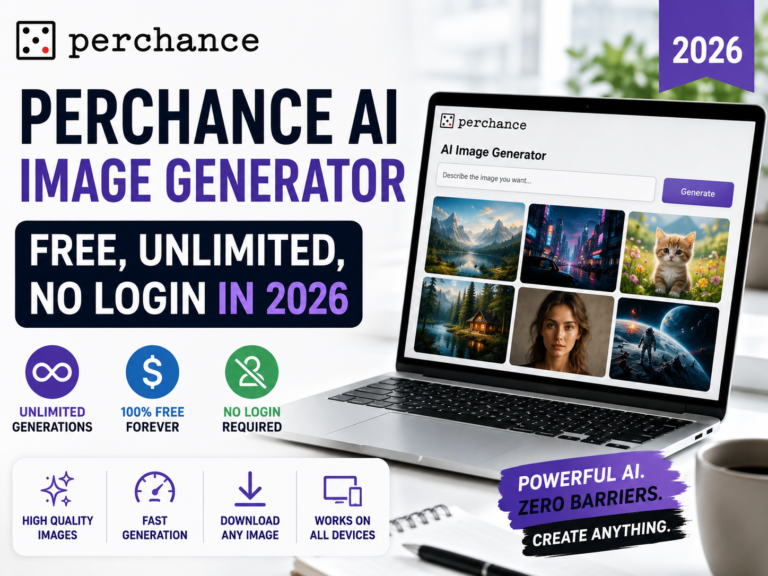
Perchance AI is one of the most-searched no-signup AI image generators, and it stands out for one specific reason: privacy. Here’s what you need to know before choosing it.
What It Is
Perchance.org hosts a community-built AI image generator at perchance.org/ai-text-to-image-generator. It runs entirely in your browser, requires zero account creation, and — notably — does not use tracking cookies. When tested, there was no cookie consent banner because there are no tracking cookies to consent to. Your generation history is not stored in any account.
How to Use It
- Go to the URL above — no account needed
- Type your prompt (be specific — the tool uses a single model, so the prompt does more of the work)
- Select image resolution (portrait, landscape, or square)
- Click Generate — results appear in 5–15 seconds
- Right-click the image and select Save Image As — there’s no download button because there’s no account to save to
What It’s Good At
- Portraits and character art — strong face detail for a free anonymous tool
- Fantasy and sci-fi scenes — handles imaginative prompts well
- Batch generation — no caps mean you can iterate freely
What It Struggles With
- Precise details — hands, faces, and text in images are noticeably weaker than DALL-E 3 or Flux 2 Pro
- Style variety — single model, so you can’t choose between photorealistic, anime, or artistic styles
- No editing tools — no inpainting, no upscaling, no canvas
Craiyon vs Perchance AI vs AI Free Forever
These three are the most commonly compared zero-signup tools. Here are the actual differences that matter:
👉 Swipe left/right to see all columns
| Feature | Craiyon | Perchance AI | AI Free Forever |
|---|---|---|---|
| Account required? | None | None | None |
| Daily limit | Unlimited | Unlimited | Unlimited |
| Watermark on download | Yes (free tier) | No | No |
| Image quality | 6.5/10 | 7.5/10 | 8.5/10 |
| Number of AI models | 1 | 1 | 20+ |
| Generation speed | Slow (30+ sec) | Fast (5–15 sec) | Fast (5–15 sec) |
| Privacy | Standard | Maximum — no tracking | Standard |
| Commercial use | Yes, with attribution | Check terms | Yes — permitted |
The verdict: For most people, AI Free Forever wins outright — better quality, more models, no watermark, zero signup. Choose Perchance AI if privacy is your top concern. Choose Craiyon only if you specifically want 9 simultaneous variations and quality doesn’t matter.
Which Tool Should You Use?
👉 Swipe left/right to see all columns
| Your Situation | Best Tool | Why |
|---|---|---|
| Highest image quality, already have Microsoft account | Microsoft Copilot | DALL-E 3 quality, no new signup, 15 fast/day free |
| Zero signup AND 20+ premium models | AI Free Forever | No account ever, unlimited, Flux + Imagen 4 + more |
| Total privacy — no data collected at all | Perchance AI | Completely anonymous, unlimited, no watermarks |
| 30+ artistic style models without login | Deep Dream Generator | 30+ models, video generation — free tier is watermarked |
| Fastest possible generation speed | FreeGen.app | Under 10 seconds, Z-Image Turbo powered |
| Anime, Ghibli, pixel art, or niche styles | Flat AI | 25+ specialized models, upscaler included |
| Platform-specific aspect ratios (16:9, 9:16) | Imagefree | Multiple ratios built in, unlimited, no watermark |
| Unlimited with zero quality expectations | Craiyon | Unlimited forever, no account — but lower quality |
| Commercial-safe images for client work | Adobe Firefly | Best quality, copyright-safe, 60-second free account |
Prompt Tips That Work on These Tools
The single biggest factor in image quality is not which tool you use — it’s how you write the prompt. Here’s what worked across all ten tools during testing:
Real Examples from Testing
- ❌ Weak: “a dragon” — produced generic, poorly composed results on every tool
- ✅ Strong: “An ancient red dragon perched on a mountain peak at sunset, dramatic cinematic lighting, fantasy concept art, ultra detailed, 4K” — produced correctly posed, well-lit results on Copilot and AI Free Forever
- ❌ Weak: “coffee shop” — generated random cafés with flat lighting
- ✅ Strong: “Cozy independent coffee shop interior, warm golden afternoon light, wooden tables with books, bokeh background, photorealistic, soft focus” — produced intentional-looking compositions
Keywords That Actually Made a Difference
- Lighting: golden hour, dramatic lighting, soft window light, studio lighting, backlit
- Camera: bokeh, shallow depth of field, wide angle, close-up portrait, aerial view
- Style: photorealistic, cinematic, watercolor, oil painting, anime, concept art, 3D render
FAQs
What is the best AI art generator with no signup in 2026?
For most people, AI Free Forever is the best no-signup option — it offers 20+ premium AI models, unlimited generations, no watermarks, and commercial use permitted. If you already have a Microsoft account, Microsoft Copilot produces higher-quality images (DALL-E 3) but restricts free-tier images to personal, non-commercial use. Perchance AI is the best choice for maximum privacy.
Can I use AI art generated without a signup for commercial use?
It depends on the tool. AI Free Forever explicitly allows commercial use. FreeGen.app permits commercial use per its terms. Adobe Firefly (free account required) offers IP indemnification for commercial work — the strongest legal protection available. Craiyon permits commercial use on its free tier but requires attribution. Microsoft Copilot’s free tier is for personal, non-commercial use only. Always check the current terms of service before using AI-generated images for paid work.
Do no-signup AI art generators add watermarks?
Most do not. Craiyon and Deep Dream Generator’s free tier are the two exceptions — both apply watermarks on free downloads. Microsoft Copilot, AI Free Forever, Perchance AI, Imagefree, FreeGen.app, Flat AI, and Magic Studio AI all provide watermark-free downloads on their free no-signup tiers.
Which free AI image generator is truly unlimited with no signup?
Five tools on this list offer genuinely unlimited AI image generation with no signup: Perchance AI, AI Free Forever, Craiyon, Imagefree, and FreeGen.app. Of these, AI Free Forever is the best overall because it pairs unlimited access with 20+ premium models and no watermarks. Perchance AI is the most privacy-focused. Craiyon adds a watermark on free downloads and has the lowest quality.
Is the Perchance AI image generator free with no account?
Yes. The Perchance AI image generator at perchance.org/ai-text-to-image-generator is completely free, requires no account, and has no daily generation limits. It also uses no tracking cookies — one of the few tools on this list that can claim that. The trade-off is a single model with 7.5/10 image quality, so it’s best for privacy-focused use rather than maximum output quality.